
Read time: 7 min
Table of Contents
- What Is a Cross-Domain Canonical?
- The Strange De-Indexing Report
- The Real Explanation — JavaScript Errors and Duplicate Detection
- Mueller’s Response — All Roads Lead to De-Indexing
- Mueller’s Prevention Advice — Test Before You Go Live
- Are Cross-Domain Canonical De-Indexings Actually Real?
- What to Check If This Happens to You
- Bottom Line
A Reddit post in the r/bigseo community recently described a confusing de-indexing situation. A site owner discovered their pages were losing Google visibility. Moreover, an unrelated casino website appeared to have replaced their pages in Google’s index. Google’s John Mueller responded with both an explanation and practical prevention advice.
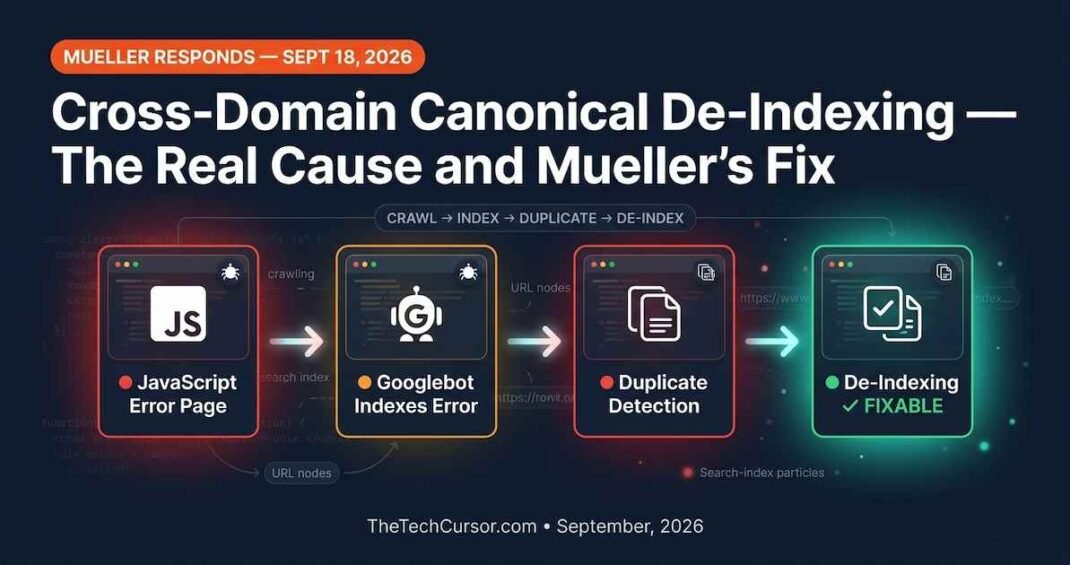
The case turns out to be less about cross-domain canonicals and more about something far more common — JavaScript errors and Google’s duplicate content detection. However, Mueller’s response contains advice that applies to every site owner managing a technically complex website.
1. What Is a Cross-Domain Canonical?
Before diving into the case, it helps to understand what a cross-domain canonical actually is and when it legitimately applies.
A cross-domain canonical is a meta tag that tells search engines the content on one website is the same as content on another website. It is the multi-domain version of the standard canonical tag that handles URLs within the same site.
Originally, cross-domain canonicals served two main use cases. First, they indicated that a site had migrated from one domain to another — but only when a 301 redirect was not possible. Second, they signaled that a page was a syndicated copy of content that originally appeared on a different domain.
However, Google’s guidance on both use cases has evolved significantly. For domain migrations, 301 redirects are almost always possible and far more reliable. For syndicated content, Google now recommends using a meta noindex tag on the syndicated copies instead.
Consequently, there is very rarely a good reason to use a cross-domain canonical in 2026. Better alternatives exist for every legitimate use case. A canonical tag is only a hint — Google is not obligated to follow it. In contrast, a 301 redirect and a meta noindex directive are much more reliable signals that Google consistently respects.
2. The Strange De-Indexing Report
The Reddit user described an unsettling situation. Their site was experiencing growing de-indexing of pages. When they investigated, they found something strange. Google appeared to have selected a casino website as the canonical version of their content — despite the two sites having completely unrelated content.
The Redditor described it this way: their pages were about companies and suppliers. However, Google appeared to be treating a casino betting page as the canonical version of their content. There was no similarity between the two sites. Furthermore, they could not find any page on the casino site that resembled their content.
This description understandably created alarm. If an unrelated site can canonicalize your content and cause your pages to be de-indexed, that would represent a serious and unfair vulnerability in Google’s systems.
3. The Real Explanation — JavaScript Errors and Duplicate Detection
Another community member provided a crucial insight that reframed the entire situation. A similar thing had happened to them. The real cause was not a cross-domain canonical at all.
Their investigation revealed that their site had been showing a JavaScript error page during a temporary outage. The error message was generic — something like “Application error: a client-side exception has occurred.” Notably, this was the exact same error message that other sites displayed during their own outages.
Google’s crawler encountered this error page. Instead of recognizing it as a temporary outage, Googlebot indexed the error message as the actual page content. Furthermore, because multiple different sites were showing the exact same error message text, Google’s duplicate content detection lumped them together. It selected one as the canonical and de-indexed the others.
This is a much more plausible explanation than a genuine cross-domain canonical attack. The situation resolved itself within a few weeks once the sites returned to normal operation. Google eventually recognized the error pages for what they were and restored the correct indexing.
4. Mueller’s Response — All Roads Lead to De-Indexing
Mueller responded to the thread with an important clarification about the practical outcome of this type of situation.
He outlined three possible scenarios for what happened. In the first scenario, the site’s own page was treated as canonical but indexed with the server error message — meaning the page was not showing in search for normal content. In the second scenario, the page was treated as a soft 404 — again meaning it was not showing in search for normal content. In the third scenario, the other page was treated as canonical — once more meaning the original page was not showing in search for normal content.
Mueller’s point was direct and practical. All three possible outcomes produce the same result — the page is not visible in normal search. Therefore, the specific technical explanation of which scenario occurred matters less than fixing the underlying problem.
Furthermore, Mueller identified what the real underlying problem was. The site had been serving error pages to Googlebot. The ideal solution was not to debate which canonical scenario had occurred. Instead, it was to find ways to recognize and fix errors before they become stable problems that search engines record.
5. Mueller’s Prevention Advice — Test Before You Go Live
Mueller’s second reply contained the most practically valuable part of his response. He described his own approach to preventing this type of issue on his own websites.
His approach involves running automated tests before pushing any changes live. Specifically, whenever something goes wrong on one of his sites, he has a code agent add a new test for that scenario. Over time, this builds a test suite that catches common failure modes before they reach production. The tests take a few minutes to run but provide greater certainty that the live site will behave correctly.
Furthermore, for ongoing monitoring, Mueller described fetching the most critical pages on a regular schedule — hourly or whatever cadence makes sense for the site — and checking for issues automatically. This catches problems quickly enough to fix them before they become stable patterns that search engines record and act on.
The key insight is timing. If a site serves an error page to Googlebot once, that is unlikely to cause a lasting indexing problem. However, if a site serves error pages to Googlebot consistently over days or weeks, those error states can become established in Google’s understanding of what the page contains. Speed of detection and resolution matters significantly.
6. Are Cross-Domain Canonical De-Indexings Actually Real?
The original post described the problem as a cross-domain canonical issue. However, the deeper analysis suggests this framing may be inaccurate.
For a genuine cross-domain canonical to cause de-indexing, the affected site’s own pages would need to contain a canonical tag pointing to the casino site. That would be an extremely unusual configuration. If it happened without the site owner’s knowledge, it would suggest the site had been compromised.
However, the JavaScript error explanation is far more consistent with what actually occurred. When multiple sites show the identical error message during outages, Google’s duplicate detection system can group them together. Additionally, it can select one as the canonical — not because of any intentional canonical tag, but because the content is literally identical text.
An SEO analyst who covered this story made an important point about SEO coincidences. Sometimes things appear causally related when they are actually independent events happening simultaneously. A site experiences de-indexing. The site owner notices an unrelated site appearing in their search results. The natural instinct is to connect these two observations. However, the actual cause may be something entirely different — in this case, error pages rather than canonical manipulation.
The practical lesson is to investigate the simplest and most common explanation first. Error pages, server issues, and temporary outages are far more common causes of de-indexing than cross-domain canonical manipulation.
7. What to Check If This Happens to You
If you discover your pages are de-indexed, and another site appears to have replaced them, follow this investigation sequence.
Step 1: Use Google Search Console’s URL Inspection tool. This is Mueller’s first recommendation. The live URL checker in Search Console shows how Google is currently rendering your page. If Google is seeing an error page instead of your actual content, this will reveal it immediately.
Step 2: Check your server logs for Googlebot. Review your server logs for the time period when de-indexing began. Look for Googlebot requests that received error responses — 5xx server errors or client-side JavaScript errors that returned a 200 status code with error content. This reveals whether Googlebot encountered errors during its crawl.
Step 3: Check your actual canonical tags. Inspect your page source for canonical tags. Verify that your canonical tags point to your own URLs and not to any third-party domains. If you find unexpected canonical tags pointing to external domains, your site may have been compromised and requires immediate security attention.
Step 4: Search for the error message text. If your site has shown JavaScript error messages, search Google for the exact text of that error message. If multiple unrelated sites appear in the results showing the same error text, this confirms the duplicate detection scenario Mueller described.
Step 5: Wait and monitor. As the community member who shared their similar experience noted, this type of situation often resolves itself once the underlying error is fixed. Google eventually recognizes that the error pages were temporary and restores correct indexing. However, monitoring Search Console carefully during the recovery period helps you track progress.
8. Bottom Line
The cross-domain canonical de-indexing report turned out to be less about canonicals and more about a specific and preventable scenario. JavaScript errors served to Googlebot during outages can cause duplicate detection issues that result in de-indexing.
Mueller’s prevention advice is clear and actionable. Run automated tests before pushing changes live. Monitor your most critical pages on a regular schedule. Detect and fix errors quickly before they become stable patterns that search engines record.
The Two Key Takeaways
First, investigate the simplest explanation first. Most de-indexing events have straightforward technical causes. Error pages, crawl blocks, and server issues are far more common than canonical manipulation.
Second, site monitoring is not optional. If Googlebot can discover and record error states on your site before you know about them, you have a monitoring gap. Fixing that gap — through automated testing or third-party monitoring tools — prevents the class of problems Mueller described. Technical SEO audits that include monitoring setup are worth more than audits that only identify existing problems.