
Read time: 8 min
Table of Contents
- Why AI Makes CRO Audits Faster and Better
- What Claude Can and Cannot Do in a CRO Audit
- Step 1 — Heuristic Analysis With Claude
- Step 2 — Landing Page Copy Review
- Step 3 — User Journey Mapping
- Step 4 — Form and Checkout Friction Analysis
- Step 5 — Hypothesis Generation and Test Prioritization
- The Prompts That Actually Work
- How to Combine Claude With Your Analytics Data
- Bottom Line
A full CRO audit — covering landing pages, user journeys, copy, forms, and test hypotheses — typically takes an experienced conversion specialist several days of focused work. With Claude, the same audit can be completed in a fraction of the time, with deeper coverage and more structured output.
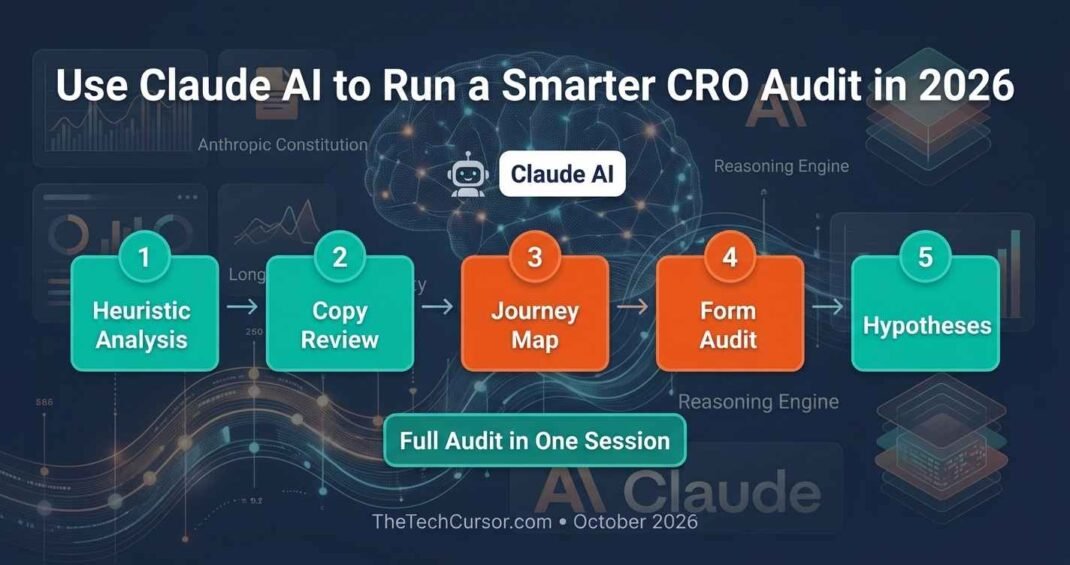
This is not about replacing CRO expertise. It is about using Claude to handle the systematic, time-intensive parts of the audit — so you can focus your expertise on interpretation, prioritization, and test design.
Here is a complete framework for running a CRO audit with Claude in 2026 — including the specific prompts that produce the most useful output.
1. Why AI Makes CRO Audits Faster and Better
CRO audits involve two types of work: pattern recognition and creative hypothesis generation.
Pattern recognition — identifying broken elements, friction points, missing trust signals, weak CTAs, confusing navigation — is systematic work. It follows established frameworks like heuristic analysis, cognitive walkthrough, and conversion-focused copywriting principles. This is exactly the kind of structured, rule-based evaluation that Claude performs exceptionally well.
Creative hypothesis generation — turning identified problems into testable solutions — benefits from Claude’s ability to draw on a wide range of conversion optimization principles, psychological research, and real-world examples simultaneously. Claude can generate more hypothesis variations faster than most teams produce manually.
Furthermore, Claude can process large amounts of page content simultaneously — reviewing an entire landing page, a multi-step checkout flow, or a full email sequence in a single pass — rather than requiring the sequential, page-by-page review that manual audits demand.
The result is an audit that covers more ground, applies more frameworks, and produces more actionable output — in less time than traditional approaches.
2. What Claude Can and Cannot Do in a CRO Audit
Understanding Claude’s capabilities and limitations prevents over-reliance and ensures the audit output is used appropriately.
Claude CAN:
- Apply heuristic evaluation frameworks to page copy and structure you provide
- Identify potential friction points, missing trust signals, and weak value propositions
- Generate multiple hypothesis variations for A/B testing
- Prioritize hypotheses by estimated impact using conversion optimization frameworks
- Review form field sequences and checkout flows for unnecessary friction
- Analyze email sequences for conversion-blocking copy patterns
- Produce structured audit reports in whatever format you specify
Claude CANNOT:
- Access your Google Analytics, GA4, or heatmap data directly without integration
- See your actual pages without you providing the content
- Know your specific audience, their objections, or their language without you providing that context
- Validate hypotheses with real data — that requires running actual tests
- Replace qualitative research — user interviews, session recordings, and usability testing
The most effective CRO audits with Claude combine its systematic analysis with your own analytics data, user research, and audience knowledge. Claude handles the framework application; you provide the context and validate with data.
3. Step 1 — Heuristic Analysis With Claude
Heuristic analysis evaluates a page against established conversion principles — without user testing. It is the fastest way to identify obvious friction points before investing in more complex research.
The framework to use: LIFT Model — Value Proposition, Relevance, Clarity, Anxiety, Distraction, and Urgency. These six dimensions cover the primary factors that influence conversion on any landing page.
How to run it with Claude:
Paste your landing page content — headline, subheadline, body copy, CTA text, and a description of the visual layout — into Claude with this prompt structure:
“Evaluate this landing page using the LIFT Model framework. For each of the six dimensions — Value Proposition, Relevance, Clarity, Anxiety, Distraction, and Urgency — give it a score from 1 to 10, identify specific elements that hurt the score, and suggest concrete improvements. Structure your output as a table followed by detailed explanations for any dimension scoring below 7.”
The output gives you a structured starting point for the full audit — identifying the highest-priority dimensions to address before generating hypotheses.
4. Step 2 — Landing Page Copy Review
Weak copy is the most common conversion killer — and one of the areas where Claude adds the most value, because copy review requires both systematic framework application and creative rewriting capability.
The three copy problems Claude identifies best:
Feature-focused vs benefit-focused language: Most landing page copy describes what a product does rather than what it does for the user. Claude is excellent at identifying feature language and rewriting it as benefit language — because the transformation follows a consistent pattern: “We offer X” → “You get Y because of X.”
Mismatched specificity: Vague claims — “powerful,” “easy to use,” “industry-leading” — signal low credibility to visitors. Claude identifies vague language and suggests specific, evidence-backed alternatives.
Missing objection handling: Every visitor arrives with objections. Copy that does not address the most common ones loses conversions at the trust-building stage. Claude can identify objection gaps when you provide context about your audience.
The prompt:
“Review this landing page copy for conversion effectiveness. Identify: (1) any feature language that should be rewritten as user benefits, (2) vague claims that need specific evidence, (3) missing objection handling for a [describe your target audience] considering [describe your product/service]. For each issue, provide a specific rewrite suggestion.”
5. Step 3 — User Journey Mapping
A CRO audit that only looks at individual pages misses friction that occurs between pages — the drop-off points in a multi-step journey that are invisible when you review each step in isolation.
Claude can map the friction in a multi-step user journey when you provide the sequence of pages and the transitions between them.
How to structure the input:
Describe each step in the journey: what the user sees, what action they are asked to take, and what happens next. Include the copy of key elements — headlines, CTAs, form fields — at each step.
The prompt:
“Map the friction points in this [checkout / signup / onboarding / application] journey. For each step transition, identify: (1) potential reasons a user might abandon at this point, (2) expectation mismatches between what the previous step promised and what this step delivers, (3) cognitive load increases that could be reduced. Produce a friction map with the highest-risk drop-off points ranked by estimated impact.”
The output gives you a prioritized view of where in the journey to focus test investment — rather than optimizing individual pages based on gut feel.
6. Step 4 — Form and Checkout Friction Analysis
Forms are where more conversions are lost than at almost any other point in a user journey. Every unnecessary field, confusing label, and missing trust signal costs conversions.
Claude evaluates forms systematically against established best practices — field count, label clarity, error message quality, trust signal placement, and progress indication for multi-step forms.
The prompt:
“Audit this form for conversion friction. Evaluate: (1) whether each field is genuinely necessary or can be removed or deferred, (2) whether field labels are clear enough that no user would need to guess what to enter, (3) whether error messages are specific enough to tell users exactly how to correct mistakes, (4) whether trust signals — security badges, privacy statements, social proof — are present at the right moments, (5) whether the submit button copy communicates value rather than just action. Provide specific recommendations for each issue.”
For e-commerce checkout specifically, add: “Also evaluate the checkout flow for unnecessary steps, account creation pressure before purchase completion, and shipping cost reveal timing — each of which is a documented high-impact drop-off driver.”
7. Step 5 — Hypothesis Generation and Test Prioritization
The output of steps 1-4 is a list of identified problems. Step 5 turns those problems into testable hypotheses and prioritizes them by estimated impact.
Hypothesis structure: Every A/B test hypothesis should follow a consistent format — “If we [change X], then [metric Y] will [increase/decrease] because [conversion principle Z].” This structure forces clarity about what is being changed, what is being measured, and why the change should work.
The prompt:
“Based on the following audit findings [paste your findings from steps 1-4], generate A/B test hypotheses for the top five highest-impact issues. For each hypothesis, use the format: ‘If we [change], then [metric] will [direction] because [principle].’ Then prioritize the five hypotheses using the PIE framework — scoring each on Potential impact (1-10), Importance of the page/element (1-10), and Ease of implementation (1-10). Show your scoring reasoning.”
The PIE-prioritized hypothesis list becomes your testing roadmap — structured, evidence-based, and ready to hand to a developer or testing tool.
8. The Prompts That Actually Work
Beyond the step-specific prompts above, several general prompt patterns consistently produce high-quality CRO audit output from Claude.
Role assignment improves output quality: Starting with “You are an experienced CRO specialist with expertise in [your industry]” produces more focused, industry-relevant output than generic prompts.
Asking for structured output: Specifying the output format — “produce a table,” “use numbered recommendations,” “rank by estimated impact” — makes Claude’s output immediately usable rather than requiring reformatting.
Providing audience context: The more context you provide about your target audience — their sophistication level, primary objections, the language they use, their alternatives — the more relevant Claude’s copy and friction analysis becomes.
Iterating rather than starting over: Claude maintains context within a conversation. After the initial audit output, follow-up prompts like “now rewrite the headline three ways” or “expand on the checkout friction recommendations” produce progressively more refined output without repeating the full context.
9. How to Combine Claude With Your Analytics Data
Claude’s audit output becomes significantly more powerful when combined with your actual performance data.
GA4 integration approach: Export your GA4 funnel data — step-by-step drop-off rates, page-level engagement metrics, and segment performance — and paste the summary into Claude before running the audit. This allows Claude to weight its friction analysis toward the steps where real drop-off data shows the highest losses.
“Here is the funnel data showing where users drop off in our checkout flow: [paste data]. Given this data, focus your friction analysis on steps 2 and 3 where we see the highest abandonment, and prioritize hypotheses that address those specific steps.”
Heatmap and session recording context: If you have heatmap data showing where users click, scroll depth data, or session recording observations, describe those patterns to Claude before generating hypotheses. Observed behaviour provides the “why” behind the data — and Claude can incorporate behavioural context into more precise hypothesis generation.
Search Console and ad data: Traffic source context matters for CRO. Visitors arriving from branded search convert differently than visitors from paid ads or social. Providing traffic source context allows Claude to tailor its analysis to the specific audience arriving on each page.
10. Bottom Line
Claude does not replace CRO expertise — it amplifies it. The systematic, framework-based work that consumes most of a CRO audit’s time is exactly what Claude handles efficiently. The interpretation, prioritization judgment, and test design that requires genuine expertise remains yours.
A CRO audit workflow that previously took three to four days of focused work — heuristic analysis, copy review, journey mapping, form audit, hypothesis generation — can be completed in a single focused session using the framework above.
Start with step 1. Paste your highest-traffic landing page and run the LIFT Model analysis. The output will immediately identify whether the investment in a full audit is justified — and if it is, you will have a structured framework to complete it faster than any previous approach allowed.