
Published: July 15, 2026
Read time: 5 min
Performance Max advertisers have been asking for this for years. Google may finally be delivering.
Google is currently testing a new Partners (Alpha) setting inside Performance Max campaigns that gives advertisers the ability to opt in or opt out of two networks that have always been automatically included: Search Partners and the Google Display Network (GDN).
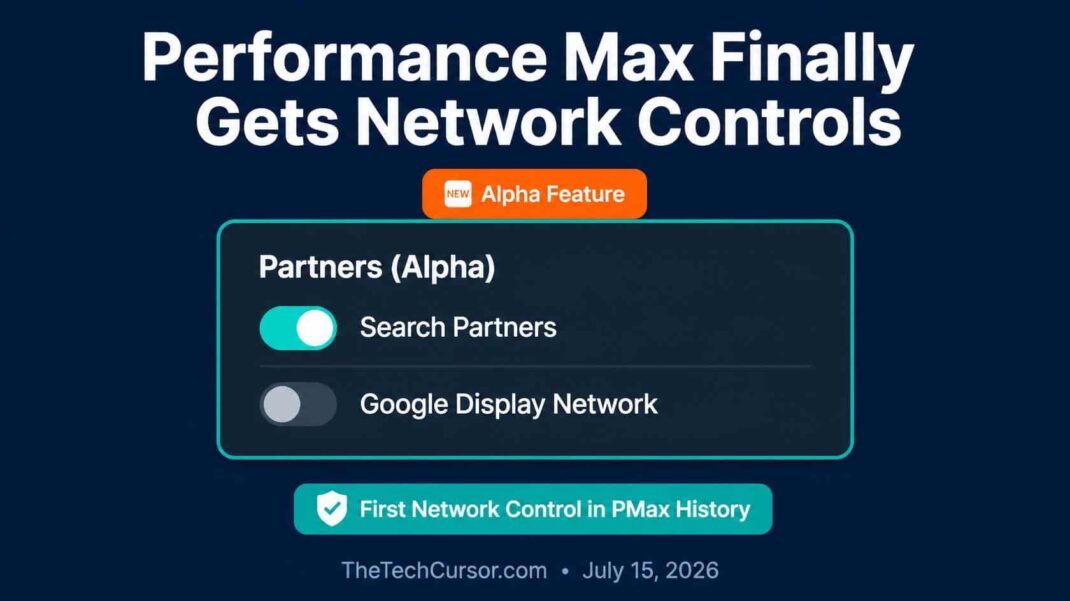
This is a small change with significant implications. For the first time, PMax advertisers may be able to control whether their campaigns run exclusively on Google-owned inventory — or extend to the broader partner and display network ecosystems.
Here is what the setting does, why it matters, and what you should consider if you gain access.
Table of Contents
- What Google Just Started Testing
- Why This Has Been One of PMax’s Biggest Complaints
- What Search Partners and GDN Actually Are
- Why Advertisers Want the Ability to Exclude Them
- What the Alpha Setting Actually Does
- Should You Opt Out of Search Partners and GDN?
- How to Check If You Have Access
- The Bigger Pattern — PMax Getting More Controls
- Bottom Line
1. What Google Just Started Testing
The Partners (Alpha) setting was first spotted by PPC Growth Strategist Saquib Syed, who shared his discovery on LinkedIn on July 15, 2026. The setting appears within Performance Max campaign settings and presents two options:
- Search Partners — include or exclude
- Google Display Network — include or exclude
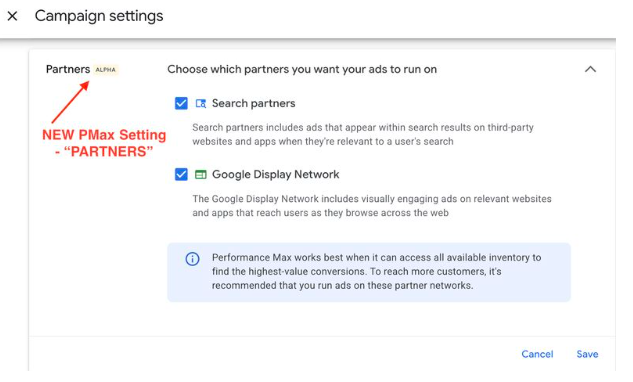
Both networks are currently included in all Performance Max campaigns by default, with no mechanism to exclude them. The Alpha setting introduces explicit opt-in and opt-out controls for each network independently.
The Alpha label indicates this is an early-stage test available to a limited number of advertisers. Google has not announced a broader rollout timeline.
2. Why This Has Been One of PMax’s Biggest Complaints
Performance Max is Google’s most automated campaign type — and its lack of granular controls has been its most consistent source of advertiser frustration since launch.
PMax campaigns run across Google Search, Shopping, YouTube, Gmail, the Google Display Network, and Search Partners simultaneously. The appeal is reach and automation. The frustration is that advertisers cannot easily understand or control where their budget is actually going across those surfaces.
For advertisers running efficiency-focused campaigns — particularly those optimizing for specific ROAS or CPA targets — the inability to exclude lower-performing networks has been a recurring issue. Search Partners and GDN have historically shown higher impression volume but lower conversion quality for many advertisers compared to Google’s own properties.
Without the ability to exclude these networks, advertisers have had to choose between accepting potentially diluted performance or avoiding PMax entirely in favour of more controllable campaign types. The Partners Alpha setting addresses that dilemma directly.
3. What Search Partners and GDN Actually Are
For advertisers less familiar with these network distinctions:
Search Partners Search Partners are websites and apps that have partnered with Google to display search ads. When your PMax campaign includes Search Partners, your ads can appear on sites like Ask.com, AOL, and hundreds of other search-powered properties — not just Google.com and Google Maps. Search Partner traffic is generally lower in intent and lower in conversion quality than traffic from Google’s own search properties.
Google Display Network (GDN) The GDN is a collection of millions of websites, apps, and YouTube content where Google-served display ads appear. It provides enormous reach — reportedly over 90% of internet users globally — but at significantly lower intent than search. Display inventory is best suited for awareness campaigns rather than direct response objectives.
Both networks serve legitimate purposes in specific campaign contexts. However, for advertisers whose primary objective is efficient conversion or revenue generation, including both networks automatically in every PMax campaign creates a budget allocation question that has been difficult to address without exclusion controls.
4. Why Advertisers Want the Ability to Exclude Them
The case for excluding Search Partners and GDN from Performance Max campaigns is straightforward for certain advertiser profiles:
Lower conversion quality: For many advertisers, traffic from Search Partners and GDN converts at significantly lower rates than traffic from Google Search. When a budget is shared across all networks without control, lower-converting inventory can dilute overall campaign ROAS.
Attribution complexity: Display impressions from GDN create attribution ambiguity. A user who sees a display ad and later converts through a search click may be attributed differently depending on your attribution model — making it harder to understand what is actually driving conversions.
Brand safety concerns: GDN placements can appear on websites that do not align with brand standards. Without placement exclusion controls at the network level, brand safety management in PMax has required workarounds.
Budget efficiency: Advertisers with limited budgets often prefer to concentrate spend on the highest-intent inventory — Google Search — rather than spreading it across lower-intent partner and display networks.
5. What the Alpha Setting Actually Does
Based on what has been shared publicly, the Partners Alpha setting provides two independent controls:
Search Partners toggle: When disabled, your PMax campaign will not serve on Search Partner properties. Traffic will concentrate on Google-owned search surfaces — Google.com, Google Maps, Google Images, and Google Shopping.
Google Display Network toggle: When disabled, your PMax campaign will not serve display ads on the GDN. This removes the display inventory component while keeping search, YouTube, and Gmail placements active.
Importantly, the two controls appear to be independent — allowing advertisers to exclude one without the other. An advertiser could, for example, keep Search Partners enabled while disabling GDN, or vice versa.
6. Should You Opt Out of Search Partners and GDN?
The answer depends on your specific campaign objectives and performance data.
Consider excluding Search Partners if:
- Your Search Partner impression share is high, but the conversion rate is significantly below your Google Search conversion rate
- Your CPA from Search Partners is above target, while your Google Search CPA is at or below target
- You have a limited budget that would be better concentrated on higher-intent inventory
Consider excluding GDN if:
- Your campaign objective is primarily direct response rather than awareness
- Display impressions are creating attribution complexity without demonstrably contributing to conversions
- Brand safety management is a concern
Consider keeping both enabled if:
- Your current PMax performance is strong, and you do not have evidence of network-level inefficiency
- Your campaign objectives include awareness alongside conversion goals
- You do not yet have enough data to determine whether excluding networks would improve or harm performance
The recommended approach: If you gain Alpha access, do not immediately disable both networks. Instead, run a controlled test — disable one network at a time for 2-4 weeks and monitor the impact on ROAS, CPA, and conversion volume before making permanent changes.
7. How to Check If You Have Access
The Partners Alpha setting is available to a limited number of advertisers and is not yet visible in most accounts. To check whether you have access:
- Open Google Ads and navigate to a Performance Max campaign
- Go to Campaign Settings
- Look for a Partners or Networks section
- If you see toggle options for Search Partners and Google Display Network, you have Alpha access
If the setting is not visible, you do not currently have access. Google has not provided a mechanism to apply for Alpha access, and no broader rollout timeline has been announced.
8. The Bigger Pattern — PMax Getting More Controls
The Partners Alpha setting is not an isolated development. It fits into a broader pattern of Google gradually adding controls to Performance Max in response to persistent advertiser feedback.
As covered in TheTechCursor’s earlier article on the DSA to AI Max migration delay, Google has shown willingness to adjust its automation push in response to advertiser feedback. PMax has been receiving incremental control additions over the past 18 months — search term reporting, brand exclusions, campaign-level asset controls, and now potentially network controls.
This pattern reflects a tension Google is actively navigating: the drive toward full automation conflicts with advertiser demand for transparency and control. The Partners Alpha setting is another step toward resolving that tension — giving advertisers more confidence to invest in PMax by reducing the “black box” perception that has limited adoption among efficiency-focused advertisers.
9. Bottom Line
Google’s Partners Alpha setting for Performance Max is exactly the kind of control advertisers have been requesting since PMax launched. The ability to opt out of Search Partners and GDN independently — rather than accepting all network inventory by default — gives efficiency-focused advertisers a meaningful new lever for campaign optimization.
The Alpha label means most advertisers do not have access yet. However, the direction is clear: Performance Max is gradually becoming more controllable, and network exclusion options represent one of the most impactful additions to the campaign type to date.
Check your campaigns for access. If the setting is available, test systematically rather than making immediate changes. The performance impact will depend on your specific campaign mix and objectives — and only data from your own account can tell you whether excluding these networks improves or hurts your results.