
Category: Google Ads | AI Agents | PPC Strategy | Digital Marketing
Read time: 9 min
Site: TheTechCursor
Table of Contents
- Why Most Teams Get AI Agents Wrong
- Step 1: Build Your Knowledge Base First
- Step 2: Centralize and Connect Your Data
- Step 3: Exhaust Off-the-Shelf AI Tools
- Step 4: Connect Live Data via MCP
- Step 5: Build Custom Systems When Off-the-Shelf Falls Short
- Step 6: Identify and Empower Early AI Adopters
- Step 7: Measure What AI Actually Contributes
- The Goal Is Not Autonomous Marketing
- Bottom Line
Every week brings a new announcement about AI agents for Google Ads. Google is building them, software vendors are selling them, and every LinkedIn post seems to suggest that the next competitive advantage is deploying an autonomous AI campaign manager as quickly as possible.
That framing is wrong — and it is leading a lot of teams to expensive mistakes.
After a year of building agentic systems for Google Ads, one thing is consistently clear: the businesses that see genuine commercial value from AI agents all follow roughly the same journey. The ones that struggle almost always skip the unglamorous early steps and jump straight to the expensive parts.
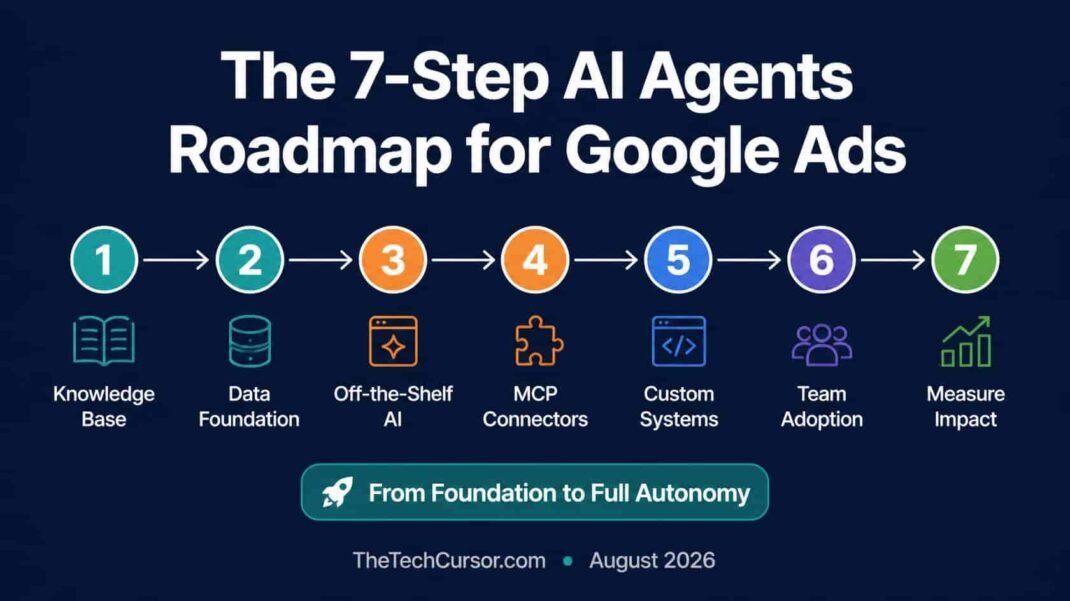
Here is the complete 7-step roadmap — from the foundation work that no vendor will sell you, to the custom systems that actually justify the investment.
1. Why Most Teams Get AI Agents Wrong
The biggest misconception about AI agents is that they compensate for poor processes. They do not. They automate those processes faster.
A disorganized Google Ads account with inconsistent naming conventions, fragmented data, and undocumented business rules does not become better when you add an AI agent. It becomes a faster-moving mess. The quality of any AI system depends less on which model you use and more on the context you give it.
Furthermore, most teams dramatically underestimate what off-the-shelf AI tools can already do — and dramatically overestimate how quickly custom agentic systems deliver value. The roadmap below is sequenced to capture maximum value at each stage before committing to the next level of complexity and investment.
2. Step 1: Build Your Knowledge Base First
Before involving AI in any Google Ads workflow, document everything an AI system would need to make sensible decisions about your account.
What your knowledge base must contain:
- Products and services — what you sell, who it is for, what problems it solves, how it differs from competitors
- Business rules — budget caps, geographic restrictions, brand safety requirements, campaign structure logic
- Tone of voice — how your brand communicates, what it never says, what register it uses in different contexts
- Campaign structure — how campaigns are organized, why, and what the naming conventions mean
- Approval workflows — what changes can be made automatically, what requires human review, and who reviews what
- Seasonal patterns — when performance typically changes, why, and what the expected responses are
The format matters as much as the content. AI systems need documentation written in plain, structured language — not a slide deck of bullet points or a wall of nested spreadsheets. Markdown files, structured text documents, or a dedicated knowledge management system all work. The goal is documentation an LLM can read, parse, and reason from without ambiguity.
This step is the least exciting — and the one most teams skip. It is also the one that determines whether everything that follows actually works.
3. Step 2: Centralize and Connect Your Data
An AI agent that cannot see the full picture of your account performance cannot make good decisions. Most Google Ads accounts have data fragmented across at least four or five disconnected sources: the Google Ads platform itself, Google Analytics, Google Merchant Center, a CRM, and often a custom reporting dashboard.
The minimum data architecture for AI agent readiness:
- Advertising performance data — campaigns, ad groups, keywords, creative, audiences — accessible in one place
- Conversion data — all conversion actions unified, deduplicated, and accurately attributed
- Audience data — customer lists, remarketing segments, and first-party signals connected to campaign performance
- Inventory and pricing data — for e-commerce accounts, current product availability and margin data connected to advertising decisions
A centralized data warehouse — Google BigQuery is the most common choice for Google Ads teams — makes all of this accessible in one place. However, the specific technology matters less than eliminating silos. An AI agent that can see campaign performance but not inventory levels, or conversion data but not customer lifetime value, will optimize for metrics that do not reflect actual business outcomes.
Fix the data foundation before you add AI. The agent is only as smart as what it can see.
4. Step 3: Exhaust Off-the-Shelf AI Tools
Most Google Ads teams have not come close to using what today’s off-the-shelf AI tools can already do — without any custom development.
Start here before building anything:
Basic AI analysis: Export your campaign data to ChatGPT or Claude and ask it to audit your account structure, identify budget waste, surface search-term opportunities, or review your shopping feed quality. The latest models are remarkably capable at analyzing large datasets and finding patterns that manual review would miss — or would take hours to surface.
Performance diagnosis: Give an AI tool your last 90 days of query data and ask it to identify the most common intents, flag irrelevant search terms, and suggest negative keyword additions. This is work that used to take experienced analysts half a day. It now takes 15 minutes.
Ad copy generation and testing: Use AI to generate headline and description variations for responsive search ads — then use your own judgment to filter the outputs to the strongest candidates. AI generates quantity; you apply quality judgment.
Reporting interpretation: Ask an AI tool to interpret your monthly performance report and surface the three most important things that changed, why they likely changed, and what the appropriate responses are. This is where good knowledge base documentation pays off immediately — the AI has the context to give relevant, specific recommendations rather than generic advice.
For many organizations, this combination delivers the majority of the value they will ever need from AI in Google Ads — without any custom development, engineering support, or high additional cost.
The rule: Build only when you have genuinely reached the limits of what off-the-shelf tools can do for your specific needs.
5. Step 4: Connect Live Data via MCP
Once you are confident in what off-the-shelf AI analysis can deliver, the next upgrade is connecting AI tools to live account data — eliminating the weekly spreadsheet export cycle.
Model Context Protocol (MCP) connectors allow AI tools like Claude and ChatGPT to query live data from Google Ads, Google Analytics, and Google Merchant Center in real time. Instead of exporting data and uploading it to an AI tool, you can query your live account directly from within the AI interface.
What MCP-connected AI workflows enable:
- Real-time account monitoring without manual data pulls
- Daily performance summaries generated automatically from live data
- Anomaly detection — the AI flags unusual performance changes as they happen, not a week later in the monthly report
- On-demand analysis with current data rather than last week’s export
This step requires some technical setup — configuring MCP connectors and ensuring appropriate access permissions — but it does not require custom development. Pre-built MCP connectors for major Google platforms are available and increasingly well-documented.
Furthermore, MCP connections work alongside your knowledge base documentation. The AI has both the live data and the business context to interpret it meaningfully — rather than surfacing raw numbers without explanation.
6. Step 5: Build Custom Systems When Off-the-Shelf Falls Short
There is a point where the combination of documented knowledge, centralized data, off-the-shelf AI, and MCP connections is no longer sufficient for your specific needs. This is when custom development becomes genuinely worthwhile.
Signals that you have reached this point:
- You need to combine advertising performance with inventory availability, margin data, and CRM signals in a single automated decision
- You want AI to continuously monitor accounts and flag issues — not just respond when prompted
- You need automated approval workflows that route certain changes for human review before execution
- Your account scale means manual monitoring is genuinely infeasible
What custom development actually involves:
Custom agentic systems for Google Ads typically include:
- Custom MCP servers — tailored data connections that pull exactly the data your system needs in exactly the format it needs
- Guardrails — explicit constraints that prevent the agent from taking actions outside defined parameters
- Orchestration — the logic that coordinates when and how different AI components interact
- Scheduling — automated timing for recurring tasks like daily bid review or weekly budget reallocation
- Cost optimization — mechanisms to prevent runaway API costs from poorly scoped agent tasks
Developers make AI systems reliable. The difference between an impressive demo and a system you can trust to run every day is the engineering work that turns interesting AI capabilities into production-grade automation.
This step requires genuine engineering investment — which is precisely why Steps 1-4 matter. Teams that skip to custom development without the foundation work consistently find that their custom systems are unreliable, expensive to maintain, and produce worse results than well-implemented off-the-shelf tools on a solid data foundation.
7. Step 6: Identify and Empower Early AI Adopters
The biggest obstacle to successful AI agent adoption is rarely the technology. It is people.
Organizations that progress fastest do not expect every team member to become an AI expert simultaneously. Instead, they identify the one or two team members who are genuinely enthusiastic about exploring AI workflows — and give them space, time, and encouragement to experiment.
What this looks like in practice:
- Dedicate specific time for early adopters to explore AI tools without the pressure of immediate output delivery
- Create a lightweight internal sharing mechanism — a Slack channel, a monthly meeting, or a shared document — where early adopters share what they have tried, what worked, and what did not
- Explicitly recognize and reward AI experimentation, including experiments that produce negative results — what does not work is as valuable to know as what does
- Use early adopter findings to build documented workflows that can be gradually adopted across the wider team
Furthermore, set realistic expectations about the pace of adoption. A team that takes six months to integrate AI tools deeply into their workflow and produces consistently better results is more valuable than a team that deploys an agent quickly and spends the following year managing its errors.
The mindset shift that matters most:
AI agents do not replace Google Ads expertise. They change where that expertise creates value. For a decade, the industry has been gradually handing more execution to algorithms — Smart Bidding, broad match, Performance Max. Agentic AI is the next stage of that evolution. The marketer’s role continues to shift from manual execution toward strategy, judgment, and the creativity that algorithms cannot replicate.
Teams that understand this frame AI adoption as a career development opportunity — not a threat. Teams that do not understand it resist AI tools as a competitive threat and fall behind those that embrace them.
8. Step 7: Measure What AI Actually Contributes
This step is consistently overlooked — and its absence is why many AI agent initiatives are difficult to justify to leadership.
If you cannot measure what your AI agent actually contributes to performance, you cannot optimize the agent, justify its cost, or make informed decisions about expanding its scope. Measurement is not optional — it is what transforms an AI experiment into a managed capability.
What to measure:
Time recovered: Track the specific tasks your AI agent handles and estimate the time those tasks previously required. Monthly reporting automation, daily anomaly detection, ad copy generation — each has a measurable time cost that is now recovered.
Decision quality: For decisions that AI agents make autonomously — bid adjustments, budget reallocations, negative keyword additions — track whether those decisions improved performance metrics against the baseline period. This requires careful A/B testing or holdout periods, but without it, you cannot know whether the agent is helping or hurting.
Error rate and correction frequency: Track how often agent outputs require human correction before implementation. A high correction rate signals that knowledge base documentation, guardrails, or data quality needs improvement — not necessarily that the AI is fundamentally limited.
Coverage expansion: Track which account surfaces are now monitored continuously that were previously reviewed only weekly or monthly. This is often where agents deliver the most value — catching performance changes that manual review would have missed.
Building a simple dashboard that tracks these metrics monthly gives leadership the visibility to make informed investment decisions — and gives the team the feedback to continuously improve the agent’s performance.
9. The Goal Is Not Autonomous Marketing
The most important reframe in this entire roadmap: the goal is not to remove humans from Google Ads management. It is to redirect where human expertise creates the most value.
AI agents are exceptionally good at repetitive, data-heavy work — auditing accounts, monitoring performance, analyzing search term patterns, surfacing optimization opportunities. When those tasks are handled by agents, experienced marketers can spend their time on strategy, creative problem-solving, client relationships, and the business judgment that algorithms cannot replicate.
The teams that will outperform over the next several years are not those with the most sophisticated agentic AI. They are those who understand where AI creates leverage, where human judgment still matters, and how to build the foundations that allow the two to work together effectively.
That is why Step 1 — building the foundation — is the most important in this entire roadmap. Everything that follows depends on it.
10. Bottom Line
AI agents for Google Ads are real, commercially valuable, and becoming increasingly accessible. However, the path to realizing that value is sequential — and most teams are tempted to skip the early steps because they are less exciting than the autonomous agent demos.
The 7-step sequence:
- Build your knowledge base — document what AI needs to know to make good decisions
- Centralize your data — eliminate silos before you add AI
- Exhaust off-the-shelf tools — most teams have not reached the limits yet
- Connect live data via MCP — eliminate the manual export cycle
- Build custom systems — only when off-the-shelf genuinely falls short
- Empower early adopters — people adoption matters as much as technology adoption
- Measure what AI contributes — without measurement, you cannot optimize or justify
Follow the sequence. Build the foundation. The agents that deliver real commercial value are the ones built on top of it.