
Read time: 5 min
Table of Contents
- What Google’s Engineers Actually Said
- Reason 1: Server Host Load Issues
- Reason 2: Crawl Demand — Google Decides It Does Not Need Your Content
- Reason 3: Google May Simply Not Want the Sitemap
- The Real Problem — The Error Message Is Misleading
- What to Do If You See This Error
- Bottom Line
Many site owners have experienced a frustrating situation. Their XML sitemap is valid. It is publicly accessible. It is properly linked from robots.txt. Yet Google Search Console reports “couldn’t fetch.”
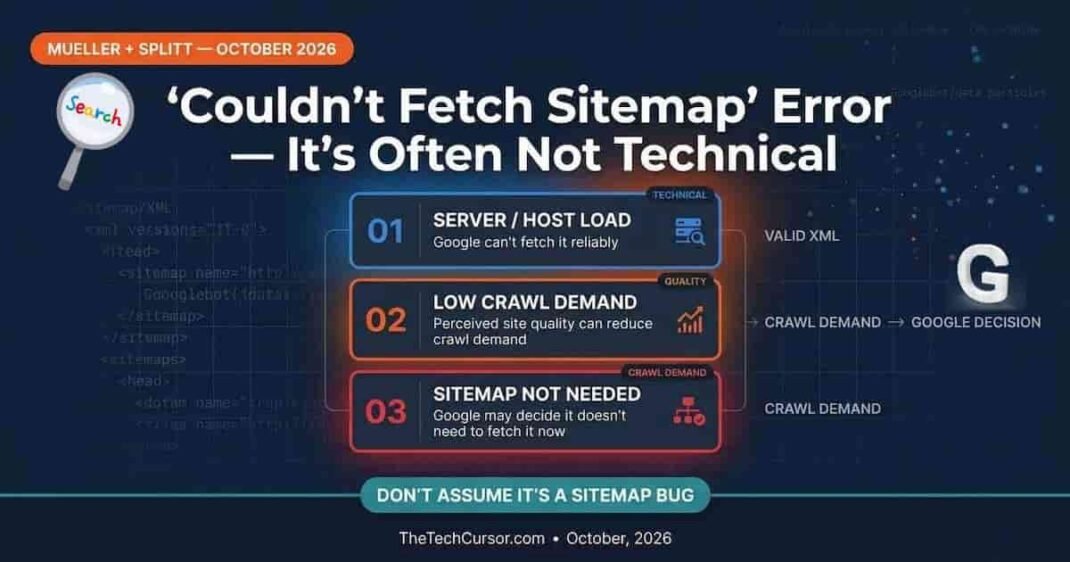
Google’s Martin Splitt and John Mueller recently addressed this error in a public discussion. Their explanation reveals something important: the error message itself is misleading. Furthermore, the real reasons for the error are often not technical at all.
1. What Google’s Engineers Actually Said
Splitt acknowledged the disconnect that many site owners experience. He confirmed that a sitemap can be valid, publicly accessible, and properly linked from robots.txt — and still trigger the “couldn’t fetch” error in Search Console.
(cite index=”8-1″>Splitt observed: “Why does Search Console sometimes show ‘couldn’t fetch’, even though the sitemap XML is valid? Because you can validate that. That’s the nice thing about such a structured format. So it’s valid, it’s publicly accessible, and it’s linked from the robots.txt. And yet Search Console says it can’t fetch sometimes.”</cite>
Mueller then explained that there are two main reasons for this — and one additional nuance that most site owners do not expect.
2. Reason 1: Server Host Load Issues
The first reason is genuinely technical. Google’s crawler may be unable to access the sitemap because the server has too many incoming requests at the time of the fetch attempt.
(cite index=”8-1″>Mueller explained: “We’ve talked about that in the past, like how much Google systems can crawl from a website. And it could be the case that we don’t have any time to crawl this sitemap file because we’re too busy with other things. That can happen. Then we would also position that as ‘couldn’t fetch’ because we didn’t have time to actually fetch it.”</cite>
This reason is fixable. Server load issues can be diagnosed through server logs. Look for 5xx error responses from Googlebot during periods of high traffic or scheduled tasks. A server that is throttling Googlebot or throwing errors under load will produce “couldn’t fetch” errors that resolve once the underlying server capacity issue is addressed.
Furthermore, some shared hosting environments have crawl rate limits that prevent Googlebot from fetching resources beyond a certain request volume. Adjusting the crawl rate in Google Search Console can sometimes help — though the more effective fix is addressing the underlying server capacity constraint.
3. Reason 2: Crawl Demand — Google Decides It Does Not Need Your Content
The second reason is where the error becomes non-technical — and where many site owners are surprised.
(cite index=”8-1″>Mueller shared: “The other, also related to host load, is kind of the crawl demand side, where if our systems say, we don’t actually have any need to crawl a lot from this website, we’re just going to skip the sitemap file because we got enough already. And the crawl demand is very often based on the perceived quality of a website. And that can have a really large impact on how much we crawl and index from a website. So it’s not purely a technical thing. Sometimes it’s that our systems assume that the overall quality of this website is not fantastic. Therefore, we’re not going to spend a lot of time crawling and indexing the content. Therefore, we’re not going to bother with the sitemap file at the moment.”</cite>
This is not what most site owners expect. Google is making a judgment about the quality of the site’s content. When that judgment is negative, Google’s crawl budget allocation for the site decreases. Consequently, the sitemap may not be fetched — not because of any technical barrier, but because Google’s systems have decided the site’s content is not worth the crawl investment.
This connects directly to the broader pattern of crawl budget being influenced by content quality. The Google old low-value pages recovery guide covers how Google’s systems form quality assessments based on the cumulative content history of a site. Sites with significant volumes of thin, low-value, or AI-generated content at scale are vulnerable to exactly this type of crawl budget reduction.
4. Reason 3: Google May Simply Not Want the Sitemap
The third reason Mueller shared adds a further nuance. Sometimes Google genuinely does not need the sitemap — and may not want it.
(cite index=”8-1″>Mueller explained: “And if we see over time that the quality of the website improves significantly, then yes, we will go off and use that sitemap file, but maybe we just don’t want to. So it is not just a technical thing from my perspective or my site’s perspective. It’s also: do we actually need the sitemap file, and do we actually want the sitemap file as well?”</cite>
This reason is the most counterintuitive of the three. A sitemap is a tool for helping Google discover URLs. If Google’s systems have already decided they have enough content from a site — or that the site’s content is not worth significant crawling — they may skip the sitemap altogether.
Furthermore, Mueller’s comment about quality improvement is worth emphasizing. He explicitly stated that if Google sees quality improvement over time, it will return to using the sitemap. This confirms that the “couldn’t fetch” error related to quality is not necessarily permanent. Sustained quality improvement is the path to resolution.
5. The Real Problem — The Error Message Is Misleading
Both Splitt and Mueller acknowledged something important about the “couldn’t fetch” error: it is misleading.
The message implies a technical access failure. However, in many cases, the actual reason is a quality or crawl demand decision that has nothing to do with technical accessibility. A site owner who receives this error naturally investigates technical causes — checking the sitemap URL, verifying the robots.txt link, testing server accessibility. Those checks will return clean results when the actual issue is content quality.
This is a known problem with Search Console reporting. The message does not match the underlying reason in a significant portion of cases. Google is aware of it. However, there is no indication that the message will be improved to provide more specific information about the actual reason.
Consequently, any investigation of this error should account for both technical and quality dimensions — not assume the error reflects a technical problem.
6. What to Do If You See This Error
The appropriate response depends on which reason is actually causing the error. Since Search Console does not tell you which reason applies, the investigation requires checking multiple factors.
Check technical accessibility first: Confirm that your sitemap URL returns a 200 response and valid XML. Verify that your robots.txt correctly references the sitemap. Check your server logs for 5xx errors during Googlebot’s typical crawl windows. If any of these checks reveal a problem, fix the technical issue first.
Check your crawl rate and server capacity: Review Search Console’s crawl stats report for patterns of server errors during Googlebot access. If errors are concentrated at specific times, investigate whether scheduled tasks or traffic spikes are causing server load issues during those periods.
Evaluate your content quality honestly: If technical checks return clean results, the “couldn’t fetch” error may reflect a crawl demand issue. Review your site’s content quality against the Google 14-point content quality checklist. Furthermore, check whether your site has a history of thin, automated, or low-value content that may have led Google to reduce its crawl investment.
Be patient about recovery: Mueller’s comment about quality improvement is encouraging but realistic. Google’s systems need to observe sustained improvement over time before they increase crawl investment. This typically takes months — not days. Improving content quality and waiting for Google to observe that improvement is the path forward when the error reflects a quality assessment rather than a technical barrier.
7. Bottom Line
Google’s “couldn’t fetch” sitemap error is misleading. It can reflect a genuine technical access failure — but it can also reflect Google’s decision that the site’s content is not worth crawling. Furthermore, it can reflect a judgment that the sitemap simply is not needed.
The Three Reasons Summary
Reason 1 (Technical): Server host load prevents Googlebot from accessing the sitemap. Fix: address server capacity and crawl rate issues.
Reason 2 (Quality): Google’s systems perceive low content quality and reduce crawl investment accordingly. The sitemap is skipped as part of that reduction. Fix: sustained content quality improvement over time.
Reason 3 (Relevance): Google does not currently need or want the sitemap for this site. Fix: quality improvement that signals the site is worth more crawl investment.
The error message itself is a known problem. Google acknowledges the message is unhelpful but has not indicated plans to make it more specific. Consequently, site owners facing this error should treat it as a starting point for investigation — not a definitive description of the actual problem.