
Category: Google Ads | Lead Generation | CRM | PPC Strategy
Read time: 8 min
Table of Contents
- The Form Fill Trap — Why Conversion Volume Lies
- The Root Cause — Data Disappears Between Ad Click and CRM
- Step 1: Define What a Qualified Lead Actually Means
- Step 2: Connect Your CRM to Google Ads
- Step 3: Implement Offline Conversion Tracking Correctly
- Step 4: Build Funnel-Stage Conversion Actions
- Step 5: Fix the Five Most Common Lead Quality Problems
- Step 6: Tell Smart Bidding What Actually Matters
- The Weekly Quality Loop — Maintaining Gains Over Time
- Bottom Line
Your Google Ads dashboard looks healthy. Click-through rates are strong. Cost per lead is efficient. Conversion volume is moving in the right direction. Your ad strength rating shows Excellent.
Then you look at your CRM — and the picture changes entirely.
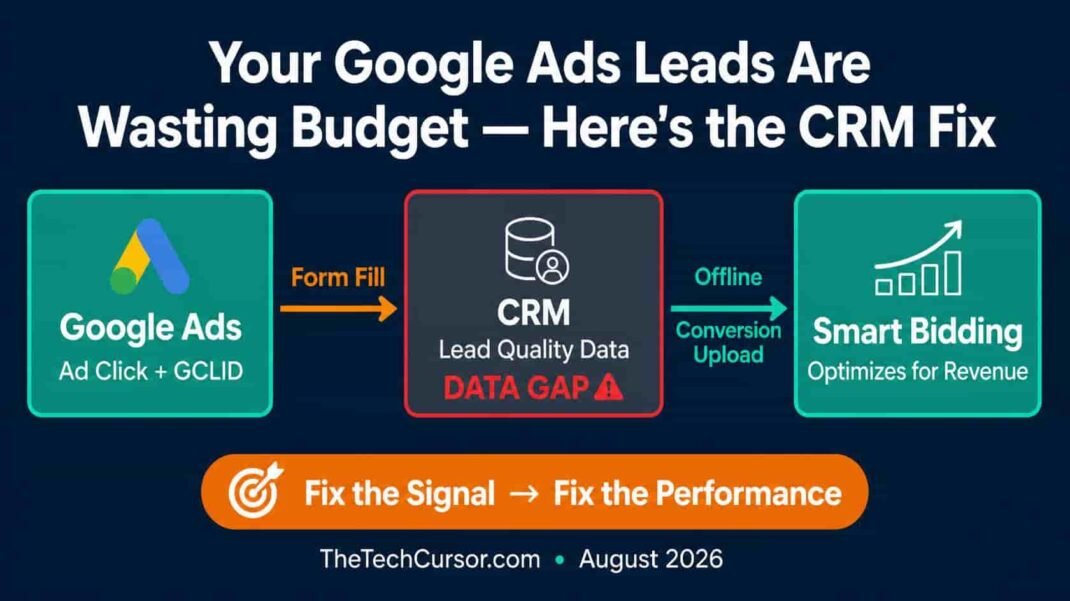
<cite index=”38-1″>Sales teams are often overwhelmed by low-quality enquiries, spam submissions, poor-fit prospects and leads that were never likely to become revenue. In those cases, the campaign is not really succeeding. It is simply generating form fills.</cite>
This is one of the most common and expensive problems in Google Ads management in 2026 — and it has a specific, solvable cause. Here is the complete framework for fixing it.
1. The Form Fill Trap — Why Conversion Volume Lies
Performance Max, Smart Bidding, and automated campaign types have made generating conversions easier than ever. However, Google’s automation optimizes for whatever signal you give it. If you tell Google that a form submission is a conversion, Google will optimize for form submissions — regardless of whether those submissions ever become revenue.
<cite index=”40-1″>When you only track a single point of conversion, like a form submission, you open the door to junk data and ultimately waste ad spend.</cite>
The result is a campaign that looks successful by every metric Google reports — and consistently disappoints by every metric the sales team cares about. More form fills. More pipeline. Less revenue. More frustrated salespeople drowning in low-quality enquiries.
The problem is not Google Ads. It is the signal you are giving Google Ads. Fix the signal — and the algorithm fixes the performance.
2. The Root Cause — Data Disappears Between Ad Click and CRM
<cite index=”34-1″>Somewhere between the form submission and the sales pipeline, lead quality data just disappears.</cite>
This gap is structural. Google Ads knows what happens at the ad click and the form submission. Your CRM knows what happens after — which leads qualified, which became customers, which went nowhere. However, for most Google Ads accounts, these two systems never talk to each other.
The result: Google’s Smart Bidding algorithm is trained on form submissions — a metric that correlates weakly with revenue for most B2B advertisers — rather than on qualified leads or closed deals, which is what the business actually needs.
<cite index=”34-1″>The first step is connecting your CRM data to Google Ads. This tells Google which leads became qualified, which turned into customers, and which went nowhere.</cite>
Everything in this framework builds on that connection.
3. Step 1: Define What a Qualified Lead Actually Means
Before connecting any systems or implementing any tracking, align with your sales team on a clear, consistent definition of lead quality. Without this alignment, your measurement infrastructure will be built on a foundation that does not reflect actual business outcomes.
Define at least three lead stages:
Marketing Qualified Lead (MQL): A lead that meets basic criteria — right company size, right industry, right geography, genuine contact information. These are form fills worth counting. They are not yet revenue signals.
Sales Qualified Lead (SQL): A lead that a sales rep has reviewed and confirmed as a genuine opportunity worth pursuing. This is the first stage that meaningfully predicts revenue — and therefore the first stage worth sending back to Google as a conversion signal.
Closed/Won: A lead that became a customer. This is the ultimate conversion signal — the one most directly connected to business value.
The distinction between MQL and SQL is critical. <cite index=”39-1″>Invalid or fake submissions, unreachable leads with incorrect contact information, and leads that never respond are common low-quality lead types that inflate MQL counts without contributing to pipeline.</cite> Sending only SQL data back to Google — rather than all form fills — trains Smart Bidding on signals that actually predict revenue.
4. Step 2: Connect Your CRM to Google Ads
CRM-to-Google Ads connection is the infrastructure that makes everything else in this framework possible.
The connection process:
<cite index=”34-1″>Capture the lead: When someone submits a form, capture the information Google will need to identify that lead later — the GCLID, email, or phone number. Track what happens next: Monitor how the lead moves through your CRM from new lead to qualified lead to customer. Confirm the outcome: Tell Google Ads whether that lead became qualified, turned into a customer, or went nowhere, so it can connect that outcome with the original ad click.</cite>
GCLID capture — the technical foundation:
The Google Click ID (GCLID) is the identifier that links a specific ad click to everything that happens afterwards. When a user clicks your ad, Google appends a GCLID parameter to the URL. Your landing page must capture that parameter and pass it into the form submission — and your CRM must store it alongside the lead record.
If the GCLID is not captured at submission, none of the subsequent data connection is possible. This is the most common technical failure point — and often the most expensive, because it is invisible until you specifically audit for it.
CRM integration options:
Most major CRMs — Salesforce, HubSpot, Dynamics, Pipedrive — have native Google Ads integrations or well-documented API connections. For simpler setups, Google’s Customer Data Platform and Data Manager provide import mechanisms that do not require custom development.
5. Step 3: Implement Offline Conversion Tracking Correctly
With CRM data connected, offline conversion tracking is the mechanism that feeds qualified lead outcomes back to Google Ads.
<cite index=”34-1″>Google recommends uploading offline conversion data regularly, ideally daily.</cite> The frequency matters because Smart Bidding updates its models continuously — stale data trains the algorithm on outdated signals, degrading bid quality over time.
The upload process:
- When a lead reaches a defined quality threshold in your CRM — becomes an SQL, reaches a specific pipeline stage, or closes — export that conversion event with its GCLID and timestamp
- Upload to Google Ads via the Conversions interface, Data Manager, or API
- Google matches the conversion to the original ad click and updates Smart Bidding models accordingly
Common implementation errors:
<cite index=”35-1″>Missing GCLID: Ensure landing pages store the GCLID in the form submission and that your CRM captures it reliably. Parameter loss in redirects or third-party forms: Test end-to-end and verify GCLID or first-party data is present in the CRM record. Upload rejections: Use Google’s upload result files to reconcile rejected rows and correct errors like mismatched account or timestamps preceding clicks. Duplicate conversions: Google deduplicates by GCLID + Conversion_Name + Conversion_Time — if you need multiple events for the same GCLID, ensure unique timestamps.</cite>
Each of these errors is invisible in standard reporting. The campaign continues running, conversions continue counting, and Smart Bidding continues optimizing — just not on the data you think it is using.
6. Step 4: Build Funnel-Stage Conversion Actions
Rather than tracking a single conversion event, build separate conversion actions for each stage of your lead funnel.
Recommended conversion action structure:
| Conversion Action | Stage | Include in Bidding Column? |
|---|---|---|
| Form submission | MQL — basic signal | No — too broad |
| SQL confirmed | Sales qualified lead | Yes — primary bidding signal |
| Opportunity created | Active pipeline | Yes — secondary signal |
| Closed won | Revenue | Yes — highest value signal |
The “Include in Conversions column” setting determines what Smart Bidding optimizes toward. Keeping form submissions in the conversions column trains Smart Bidding on volume. Moving to SQL confirmation or opportunity creation trains it on quality.
<cite index=”35-1″>Create separate conversion actions for funnel stages and decide which to include in the Conversions column. Automate daily — or regular — uploads via Data Manager, API, or integrations to keep Smart Bidding effective.</cite>
Furthermore, assign conversion values that reflect relative business value at each stage. A closed/won conversion might carry a value of $10,000 where an SQL carries $500 — reflecting the probability-weighted revenue contribution of each stage. This enables Target ROAS bidding to optimize for revenue rather than lead volume.
7. Step 5: Fix the Five Most Common Lead Quality Problems
Even with CRM connection and offline conversion tracking in place, lead quality problems can persist from multiple sources. Here are the five most common causes — and their fixes.
Problem 1: Broad or irrelevant keyword targeting. Overly broad keyword matching — particularly in Performance Max and AI Max campaigns — pulls in queries from users with no genuine purchase intent.
Fix: Add negative keywords systematically based on search term reports. Identify the query patterns that generate form fills from low-quality leads and exclude them explicitly. As covered in TheTechCursor’s AI Max migration timeline article, brand exclusions in AI Max carry over automatically — but negative keyword lists need active management.
Problem 2: Misleading ad creative. Ads that overpromise or misrepresent what happens after the click attract the wrong audience — curious browsers rather than genuine prospects.
Fix: Align ad messaging explicitly with the qualification criteria your sales team uses. If you only serve companies with 50+ employees, say so in the ad. Pre-qualifying in the creative reduces click volume but improves lead quality — and as covered in TheTechCursor’s article on why ads get clicks but don’t convert, this trade-off is almost always worth making.
Problem 3: Low-friction forms. Forms with fewer fields generate more submissions — and more unqualified submissions. A single-field email capture attracts anyone who is mildly curious.
Fix: Add qualifying fields that screen out poor-fit prospects — company size, annual revenue, specific use case, or timeline. The drop in form fill volume will be offset by a significant increase in SQL rate — which is the metric that actually matters.
Problem 4: Landing page-audience mismatch. A landing page built for one audience receiving traffic from a different audience segment produces both poor conversion rates and poor lead quality.
Fix: Audit which campaign segments are driving traffic to which landing pages. Ensure the page messaging matches the specific intent and audience of each ad group. As covered in TheTechCursor’s article on LLM traffic conversion, visitors arrive with different contexts — and your landing page must meet them where they are.
Problem 5: Spam and bot submissions <cite index=”39-1″>Invalid or fake submissions from bots and spammers inflate form fill counts without contributing any genuine pipeline.</cite>
Fix: Implement reCAPTCHA on all lead forms. Add honeypot fields — hidden form fields that genuine users do not see, but bots fill in, flagging the submission as automated. Filter known spam patterns from your CRM before uploading conversion data to Google.
8. Step 6: Tell Smart Bidding What Actually Matters
With accurate offline conversion data flowing from your CRM, Smart Bidding can now optimize for what the business actually needs rather than what is easiest to measure.
Bidding strategy progression:
Phase 1 — Establish baselines: Begin with Maximize Conversions while offline conversion data accumulates. You need at least 30-50 qualified conversion events per month before moving to target-based bidding.
Phase 2 — Target CPA on qualified leads: Once sufficient data exists, set a Target CPA based on your cost per SQL rather than cost per form fill. This trains Smart Bidding to seek the audience segments and query patterns that produce qualified leads — not just submissions.
Phase 3 — Target ROAS on revenue: If conversion values are assigned by funnel stage, Target ROAS enables optimization toward revenue contribution — the most direct alignment between bidding strategy and business outcomes.
<cite index=”36-1″>CRM-verified leads: Upload with revenue value or sales-qualified status. Customer match lists: Update regularly based on LTV or high-performing segments.</cite> These signals compound over time — each upload makes the bidding model more accurate, which improves lead quality, which produces more accurate upload data.
As covered in TheTechCursor’s article on Google’s target bidding update for budget-limited campaigns, AI Max and Smart Bidding increasingly adhere closely to stated targets. The accuracy of those targets — which depends entirely on the quality of your offline conversion data — determines whether that adherence improves or undermines performance.
9. The Weekly Quality Loop — Maintaining Gains Over Time
Lead quality improvement is not a one-time fix. It is an ongoing system that requires weekly monitoring to prevent drift.
<cite index=”40-1″>Sales stops updating CRM stages. When reps stop marking SQLs or setting close dates, the quality signal you upload to Google becomes noise. Stale data trains the algorithm just as readily as accurate data.</cite>
Weekly quality loop checklist:
- MQL-to-SQL rate by campaign and ad group: Is it stable, improving, or declining? A declining rate signals targeting drift.
- Offline conversion upload health: Are uploads completing successfully? Are rejection rates increasing? Silent failures are the most dangerous — the campaign continues to run while high-quality data stops flowing.
- Search term report review: Are new irrelevant query patterns appearing? Add negatives proactively rather than waiting for CRM data to reveal the damage.
- Form submission source audit: What percentage of submissions are spam or bot-generated? Rising spam rates require technical countermeasures.
- Budget increase alert: <cite index=”40-1″>Budget increases push the algorithm into looser audiences. Without tightening negative keyword coverage and audience exclusions alongside the budget increase, quality drifts even as conversion volume climbs.</cite> Every budget increase should trigger a corresponding review of targeting constraints.
The weekly loop is what prevents hard-won lead quality improvements from degrading back to baseline — which happens predictably when measurement and maintenance discipline lapses.
10. Bottom Line
Google Ads does not generate low-quality leads by default. It optimizes for whatever signal you give it. If that signal is form submissions, it will generate form submissions — regardless of their quality.
The fix is connecting your CRM data to Google Ads so the algorithm learns what actually constitutes a valuable lead for your business. That connection — GCLID capture, offline conversion tracking, funnel-stage conversion actions, and regular data uploads — is the infrastructure that transforms Google Ads from a form fill generator into a genuine revenue driver.
<cite index=”38-1″>To improve Google Ads lead quality, businesses need to move beyond basic conversion tracking and start optimising around value, intent and actual commercial outcomes.</cite>
The setup requires investment — technical integration, sales team alignment, ongoing maintenance. However, the ROI is straightforward: a same-or-lower budget producing a significantly more qualified pipeline is the most direct path to improving Google Ads efficiency available to most B2B advertisers in 2026.
Build the connection. Fix the signal. Let Smart Bidding do the rest.