
Read time: 5 min
Table of Contents
- What Cloudflare Just Changed
- The Old Problem — Block AI or Lose Search
- How the New Setting Works
- The Three Settings Explained
- What Happens to Your Existing Settings
- The Microsoft Gap
- What This Does NOT Do
- Should You Enable Disallow AI Training?
- Bottom Line
Cloudflare added a new setting that solves one of the most frustrating trade-offs in AI search management. Previously, blocking AI training crawlers on Cloudflare also blocked search engine bots — meaning publishers who wanted to opt out of AI training had to choose between protecting their content and maintaining search visibility.
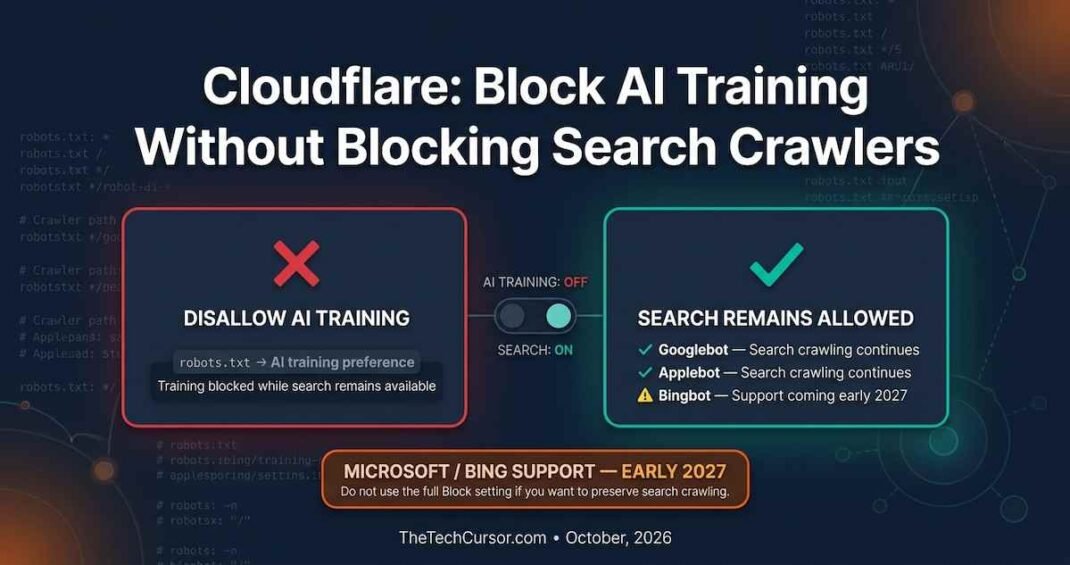
That trade-off is now resolved. The new Disallow AI Training setting lets you publish a no-training preference in robots.txt while keeping Googlebot, Bingbot, and Applebot free to crawl your site for search indexing.
1. What Cloudflare Just Changed
Cloudflare published an update to its AI crawler management settings. The update adds a new option called Disallow AI Training. This option is separate from the existing Block AI Bots setting.
The key distinction is what each setting blocks. The Block AI Bots setting stops all crawlers — including search engine crawlers. The new Disallow AI Training setting stops only AI training crawlers. Search engine crawlers remain unaffected.
Furthermore, Cloudflare is deprecating two older settings: Block AI Bots and Managed Robots.txt. These are being replaced by the new framework.
2. The Old Problem — Block AI or Lose Search
The core problem the new setting solves is worth understanding clearly. Many crawlers serve dual purposes. Google’s crawlers, for example, both index pages for search and gather content that feeds AI training and AI search products.
Cloudflare’s previous Block setting stopped all crawlers it classified as mixed-use. In July, Cloudflare explained this for mixed-use crawlers — choosing Block meant that search crawlers were also blocked because some crawlers handle both functions.
Consequently, a publisher who wanted to opt out of AI training but maintain search visibility faced an impossible choice. They could block AI training and lose search visibility. Alternatively, they could maintain search visibility and accept AI training. There was no middle path.
The Disallow AI Training setting creates that middle path.
3. How the New Setting Works
When you enable Disallow AI Training, Cloudflare adds a no-training directive to your robots.txt file. This communicates your preference to crawlers that support this standard.
Google manages this through Google-Extended — its specific robots.txt token for content that should not be used for AI training. Apple manages it through Applebot-Extended. Both of these tokens allow publishers to distinguish between content that can be indexed for search and content that should not be used for AI model training.
The Disallow AI Training setting essentially automates the process of adding these tokens to your robots.txt. Instead of manually editing your robots.txt file, you toggle the setting in Cloudflare’s dashboard, and the correct directives are added automatically.
4. The Three Settings Explained
Cloudflare’s updated AI crawler management now offers three distinct approaches.
Disallow AI Training (new): Publishes a no-training preference in robots.txt. Allows search engine crawlers to continue indexing your content. Blocks use of your content for AI model training by crawlers that respect the standard. This is the recommended setting for publishers who want search visibility while opting out of AI training.
Block AI Bots (existing — being deprecated): Blocks all crawlers classified as AI-related. This includes both AI training crawlers and mixed-use crawlers that also handle search indexing. Choosing this setting risks blocking search engine access to your content. Cloudflare is deprecating this setting.
No restriction: Allows all crawlers to access your content without restriction. Content may be used for both search indexing and AI training. This is the default for sites that have not actively managed their crawler settings.
The deprecation of Block AI Bots means you need to take action if you currently use that setting. Cloudflare will automatically update existing Training blocks to match the new Disallow AI Training setting. However, if you are using the Block AI Bots setting to prevent all AI crawler access — including search — you need to review your settings before the deprecation takes effect.
5. What Happens to Your Existing Settings
This is the most important practical consideration for any site currently managing Cloudflare AI crawler settings.
Cloudflare stated that existing Training blocks will be automatically updated to match the new Disallow AI Training setting. However, the Block AI Bots setting and Managed Robots.txt are being deprecated.
The action required depends on your current configuration.
If you are using a Training block: Your setting will be automatically migrated to Disallow AI Training. No action required unless you want a different configuration.
If you are using Block AI Bots: This setting is being deprecated. Cloudflare has not specified exactly when the deprecation takes effect. However, you should log in to your Cloudflare dashboard and review your AI crawler settings now. Determine whether you want to switch to Disallow AI Training or take a different approach.
If you are using Managed Robots.txt: This setting is also being deprecated. Review your robots.txt configuration and determine whether you want to manage it manually or use Cloudflare’s new settings.
If you have not configured AI crawler settings: Your site is currently allowing all crawlers by default. If you want to opt out of AI training while maintaining search visibility, enable the Disallow AI Training setting.
6. The Microsoft Gap
The Disallow AI Training setting works for Google and Apple because both companies have implemented support for robots.txt no-training preferences through Google-Extended and Applebot-Extended.
However, Microsoft has not yet implemented equivalent support. Cloudflare specifically mentioned that Microsoft has not yet supported a robots.txt no-training preference. Consequently, the Disallow AI Training setting does not prevent Microsoft’s crawlers from using your content for AI training.
Cloudflare noted that Microsoft plans to work on this in early 2027. Until that support is in place, publishers who want to opt out of Microsoft AI training need to manage that separately — either through direct robots.txt edits using Bingbot tokens or through other access control mechanisms.
For most publishers, the Microsoft gap is a secondary concern. Google’s AI products — Gemini, AI Overviews, AI Mode — represent the largest volume of AI content usage. However, publishers who are specifically concerned about Microsoft Copilot and Bing AI training should be aware of this limitation.
7. What This Does NOT Do
This is the most critical clarification in the entire update — and one that Cloudflare stated explicitly.
The Disallow AI Training setting does not influence whether your pages show up in AI Overviews or AI Mode. Those surfaces are managed separately in Google Search Console.
This distinction is fundamental. AI training and AI search retrieval are separate processes. Opting out of training prevents your content from being used to train AI models. It does not prevent AI search systems from retrieving and citing your content in real-time AI answers.
If you want to prevent your content from appearing in AI Overviews specifically, that requires a different approach. Google Search Console now includes settings to manage AI Overview appearances. The robots.txt no-training tokens do not affect this.
This means publishers need to manage two separate things. Training opt-outs through robots.txt tokens and Cloudflare settings. Search appearance management through Google Search Console.
8. Should You Enable Disallow AI Training?
The decision depends on your position in the publisher-AI relationship and your strategic goals.
Enable Disallow AI Training if: You want to opt out of your content being used to train AI models. You want to maintain search visibility while doing so. You believe your content has value that should not be used for free AI training. You are part of an industry effort to establish clearer boundaries around content licensing for AI training.
Consider the full picture before enabling if: You are evaluating whether to join Google’s AI payment pilot. The relationship between training opt-outs and payment eligibility is not yet clear. Furthermore, if your content’s appearance in AI-generated answers is important to your GEO strategy, understand whether training opt-outs affect your retrieval-time citations before making the change.
No action needed if: You do not use Cloudflare. Your robots.txt already manually specifies your training preferences. You have decided to allow all crawler access without restriction.
9. Bottom Line
Cloudflare’s Disallow AI Training setting resolves a genuine and frustrating problem for publishers. The ability to opt out of AI training while maintaining search visibility was previously unavailable through Cloudflare’s interface. It is now available.
The action items are clear. Check your current Cloudflare AI crawler settings immediately. If you use Block AI Bots or Managed Robots.txt, review those before deprecation. If you want to opt out of training while maintaining search, enable Disallow AI Training. Accept the Microsoft gap as a temporary limitation until 2027.
Furthermore, remember that this setting controls training only. Managing your AI search visibility and AI Overview appearances requires separate action through Google Search Console and your content strategy.
The tools for managing your relationship with AI systems are improving. Cloudflare’s update is a meaningful step toward giving publishers more precise control over how their content is used.