
Read time: 7 min
Table of Contents
- Why Anthropic’s Official Prompts Matter
- Power Prompt 1: Eliminate Mannered Prose
- Power Prompt 2: Fix AI Formatting Behaviour
- Power Prompt 3: Force Search at Low Effort Settings
- Power Prompt 4: Targeted Code Edits Over Full Rewrites
- Power Prompt 5: Finish the Whole Task Autonomously
- How to Apply These Across Different AI Tools
- Building a Prompt Library for Your Team
- Bottom Line
Most AI prompting advice comes from third-party experimenters sharing what worked for them in a specific context. Anthropic’s September 2026 prompting guide is different — it comes directly from the team that built Claude, sharing the specific prompt upgrades that address the most common failure patterns in their own models.
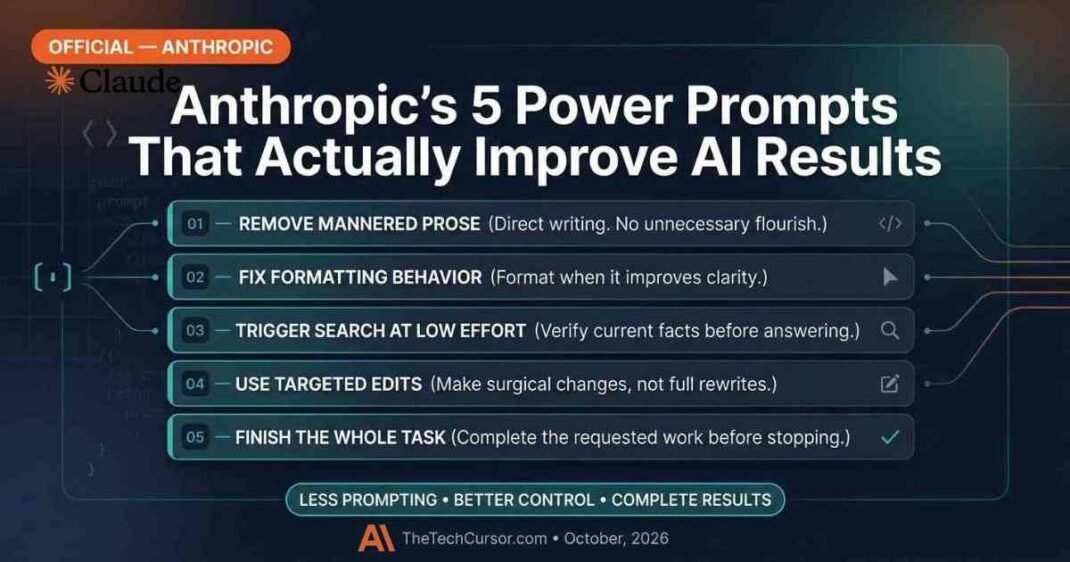
The guide covers five specific areas: writing quality, formatting behaviour, search triggering at lower effort settings, code editing efficiency, and autonomous task completion. Each comes with ready-to-use prompt language that can be applied immediately — not just to Claude, but to other AI tools with similar behaviour patterns.
Here are all five, with practical context for marketers and SEO professionals on when and how to use them.
1. Why Anthropic’s Official Prompts Matter
Prompting guides from practitioners share what worked for one person in one context. Anthropic’s guide shares what the model actually needs to perform better — based on direct knowledge of how the model behaves and why.
<cite index=”9-1″>Anthropic recently published prompting techniques for Claude Fable 5.1 that may also help users of other models save tokens and get better results.</cite>
That cross-model applicability is the key insight. The behaviour patterns these prompts address — over-reliance on metaphor, excessive formatting, skipping search when memory seems sufficient, rewriting entire files when targeted edits would do — are not unique to Claude. They appear across most major AI tools. Prompts designed to address them in Claude will produce similar improvements in ChatGPT, Gemini, and Perplexity with minor adjustments.
Furthermore, <cite index=”9-1″>AI models are constantly changing</cite>, which means prompts that worked well with a previous model version may need updating. Anthropic’s guide explicitly addresses this — some of the prompts exist because Fable 5.1 behaves differently from previous Claude models, requiring system prompts to be refreshed accordingly.
2. Power Prompt 1: Eliminate Mannered Prose
This is the most universally applicable prompt in the guide — and the one that produces the most immediate, visible improvement in AI writing quality.
The problem it solves:
AI writing frequently substitutes metaphor and flourish for direct statement. Instead of saying something plainly, it reaches for a more “interesting” phrase. The result is writing that draws attention to itself rather than conveying information efficiently.
<cite index=”9-1″>Anthropic calls this kind of writing “mannered prose.” The phrases exist to display the writer, not to convey the idea, and readers can tell. That is why mannered prose irritates: it makes the reader work harder so the writer can perform. It is also imprecise. Metaphors drag in connotations the writer did not choose and cannot control.</cite>
The long version prompt:
“Mannered prose substitutes metaphor and flourish for direct statement. Instead of ‘a parameter worth varying,’ the mannered writer produces ‘a dial worth turning.’ Instead of ‘this point still matters,’ they write ‘this point earns its keep.’ The phrases exist to display the writer, not to convey the idea, and readers can tell. That is why mannered prose irritates: it makes the reader work harder so the writer can perform. It is also imprecise. Metaphors drag in connotations the writer did not choose and cannot control. The fix is to say what you mean. When a literal phrase is available, use it.”
The short version prompt:
“Please remove all mannered prose.”
When to use it:
Add the long version to your system prompt or beginning of any writing brief where you want direct, professional prose — blog posts, reports, client communications, social content. The short version works as a quick fix when reviewing AI-generated drafts that feel unnecessarily flowery.
For content marketing and SEO writing, this prompt directly addresses one of the most common failure modes of AI-assisted content — producing writing that sounds like AI rather than like a knowledgeable human communicating directly with a reader.
3. Power Prompt 2: Fix AI Formatting Behaviour
Formatting is one of the most common sources of friction between what AI produces and what users actually want. Claude Fable 5.1 changed its default formatting behaviour — and existing system prompts designed for previous models may now produce unexpected results.
<cite index=”9-1″>Fable 5.1 uses less formatting, including bold, headings, lists, and quotation marks, than previous models. This means that users with anti-formatting rules may have to adjust their prompts to account for this new behaviour. Anthropic recommends removing those rules altogether or creating new rules that explain when to use them.</cite>
The recommended formatting prompt:
“Use lists and bullet points when asked to, or when the content is multifaceted enough that they help with clarity. If the person explicitly requests minimal formatting, always format your responses without bullet points, headers, lists, or bold emphasis, as requested. In conversational, personal, or emotional exchanges, keep to plain prose.”
When to use it:
This prompt is particularly valuable for teams using Claude in content production workflows. If your system prompt previously included rules like “never use bullet points” or “avoid bold text,” those rules may now conflict with Fable 5.1’s already-reduced formatting defaults — producing unexpected behaviour.
Furthermore, the logic behind this prompt — format based on whether it adds clarity, not as a default — is sound advice for any AI tool. Apply a version of this prompt whenever you want AI output to match the formatting standards of your specific channel: long-form blog posts need different formatting than social captions or email sequences.
4. Power Prompt 3: Force Search at Low Effort Settings
Claude Fable 5.1 offers multiple effort levels — and the lower settings are significantly cheaper to run. However, lower effort settings come with a specific trade-off.
<cite index=”9-1″>Fable 5.1 relies less often on search and retrieval tools at low effort settings and leans more on its parametric memory. So if you’re using the low setting to save on cost, this prompt can provide a bump in performance without moving to a more expensive setting.</cite>
This matters because parametric memory — what the model learned during training — goes stale. For fast-moving topics like AI tools, marketing platforms, company news, and algorithm updates, a model’s training data is out of date almost immediately. Low-effort responses to these queries may sound authoritative while being factually wrong about current reality.
The low-effort nudge prompt:
“When a query centers on a name you do not confidently recognize, or recognize from a fast-moving area like AI models and developer tools where the landscape shifts within months, the name itself is the thing to verify: search before answering, and include the name as the user wrote it in at least one query alongside any reformulations. This holds even when you have some background on it — partial background is exactly what makes an out-of-date answer sound authoritative, so familiarity is not a reason to skip the search.”
When to use it:
Add this to any workflow where you are using lower-cost AI settings but still need current, accurate information — competitive research, AI tool comparisons, platform feature lookups, news-based content production. The prompt specifically addresses the failure mode where AI sounds confident about something it last learned six months ago.
For marketers doing AI-assisted research and CRO audits, this prompt prevents the specific failure mode of getting a plausible-sounding but outdated answer about a platform feature or competitor positioning.
5. Power Prompt 4: Targeted Code Edits Over Full Rewrites
This prompt is most directly relevant to developers — but it applies to any technical SEO professional, WordPress site manager, or marketer working with code snippets, CSS, schema markup, or configuration files.
The problem: AI tools have a tendency to respond to a small code change request by rewriting the entire file. A request to change one CSS property becomes a full stylesheet rewrite. A request to fix one PHP function becomes a full template replacement. This wastes tokens, introduces unintended changes, and creates version control problems.
<cite index=”9-1″>Anthropic describes this as a solution to a Fable 5.1 behaviour, but the prompt should prove useful across a wide range of AI coding tools and agents.</cite>
The targeted edits prompt:
“The number of tokens used to edit files is best minimized, all else being equal. Therefore, when it will not affect the end result, try to surgically edit a file rather than rewrite the entire thing.”
When to use it:
Add this to any coding or technical editing workflow — schema markup updates, robots.txt changes, CSS modifications, JavaScript edits, WordPress template adjustments. For technical SEO work involving structured data or site configuration, this prompt prevents the frustrating experience of asking for a small fix and receiving an entirely rewritten file that must be reviewed in full.
6. Power Prompt 5: Finish the Whole Task Autonomously
This is the most complex and most powerful prompt in Anthropic’s guide — designed for agentic workflows where Claude is completing multi-step tasks without constant human supervision.
<cite index=”9-1″>Anthropic says that Fable is able to complete long tasks without much detailed guidance when there is a clear goal. But on “asynchronous workloads”, Fable can sometimes need a “nudge” to not end its turn but to keep going until it’s done.</cite>
The problem this addresses: AI tools often pause mid-task to ask permission before proceeding to the next obvious step — “Want me to continue?” “Shall I move on to X?” For asynchronous workflows where no human is available to answer, this pausing behaviour blocks the work entirely.
The complete autonomous task prompt:
“You are operating autonomously. The user is not watching in real time and cannot answer questions mid-task, so asking ‘Want me to…?’ or ‘Shall I…?’ will block the work. For reversible actions that follow from the original request, proceed without asking. Stop only for destructive actions or genuine scope changes the user must decide. Offering follow-ups after the task is done is fine; asking permission before doing the work is not.
Exception: when the user is describing a problem, asking a question, or thinking out loud rather than requesting a change, the deliverable is your assessment. Report your findings and stop. Don’t apply a fix until they ask for one.
Before ending your turn, check your last paragraph. If it is a plan, an analysis, a question, a list of next steps, or a promise about work you have not done (‘I’ll…’, ‘let me know when…’), do that work now with tool calls. That includes retrying after errors and gathering missing information yourself. Do not stop because the context or session is long. End your turn only when the task is complete or you are blocked on input only the user can provide.
Before running a command that changes system state (such as restarts, deletes, or config edits), check that the evidence actually supports that specific action. A signal that pattern-matches to a known failure may have a different cause.”
When to use it:
This prompt is designed for agentic workflows — overnight research tasks, multi-step content production pipelines, automated reporting processes, and any workflow where Claude Code or a similar tool is completing a substantial task without step-by-step supervision.
For marketing teams building AI-assisted content workflows or automating research processes, this prompt is the difference between a tool that completes a task and one that produces a plan and waits for approval at every step.
7. How to Apply These Across Different AI Tools
While these prompts were written for Claude Fable 5.1, most of the behaviour patterns they address appear across major AI tools. Here is how to adapt them:
ChatGPT / GPT-4o: The mannered prose prompt and formatting prompt apply directly — GPT models share the same tendency toward flourish over directness. The low effort nudge is less applicable since ChatGPT’s default behaviour already leans toward search when web browsing is enabled. The targeted edits and autonomous task prompts apply in Codex and GPT-4o coding contexts.
Gemini: The formatting prompt applies directly — Gemini also has default formatting behaviours that can be adjusted with explicit instructions. The mannered prose prompt applies and produces noticeable improvement. The search nudge is less critical since Gemini defaults to web search more aggressively than Claude at lower settings.
Perplexity: Search behaviour is Perplexity’s core function — the low-effort search nudge is less relevant. The mannered prose and formatting prompts apply when using Perplexity for writing tasks rather than research.
Key adaptation principle: Test each prompt with your specific tool and use case before adding it to a permanent system prompt. Behaviour varies enough between models that a prompt that produces the desired result in Claude may require adjustment for another tool.
8. Building a Prompt Library for Your Team
Anthropic’s five prompts are a starting point for a broader team prompt library — a shared resource that captures proven prompt upgrades for recurring workflows.
Structure for a team prompt library:
Organize by workflow type rather than by model — since the goal is selecting the right prompt for the task, not the right model:
- Writing prompts — style, tone, density, format rules
- Research prompts — search behaviour, source verification, recency requirements
- Technical prompts — coding, configuration, markup editing
- Agentic prompts — task completion, autonomous operation, error handling
- Review and editing prompts — draft improvement, fact-checking, consistency
For each prompt in the library, document: what problem it solves, which tools it has been tested on, and what the expected output change looks like. This documentation prevents the common problem of a prompt library that accumulates entries no one uses because no one knows what they are for.
Building a structured prompt library is the AI equivalent of building a reporting template — it takes time upfront and saves significant time on every subsequent use.
9. Bottom Line
Anthropic’s power prompt guide offers something most prompting content does not: direct insight from the team that built the model into the specific behaviours that prompt upgrades can fix.
The five prompts address five distinct failure modes — mannered prose, formatting drift, search-skipping at low effort, over-rewriting code, and mid-task pausing. Each has a ready-to-use solution that can be applied immediately and adapted for other AI tools.
For marketers and SEO professionals using AI tools in daily workflows, the most immediately impactful starting point is the mannered prose prompt — it produces visible improvement in writing quality across every AI tool and every writing context. Add it to your default system prompt today.
Then work through the others based on your specific workflow needs. The goal is not to use all five in every prompt — it is to understand what each one fixes and reach for it when you encounter the relevant problem.